


Pandora Music for TV
3.3252.00 Reviews
App Specs
- Version
- 4.3.1
- Updated On
- License
- Free
- Downloads
- 10,000,000+
- Developer
- Pandora
- Categories
- Music & Audio
- Platform
- Android
Screenshots
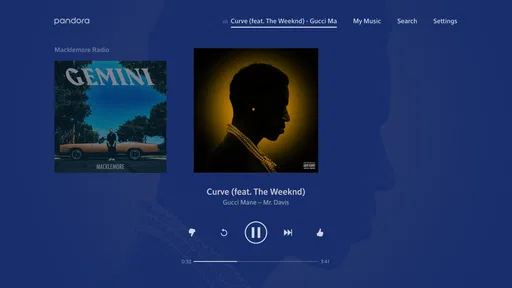
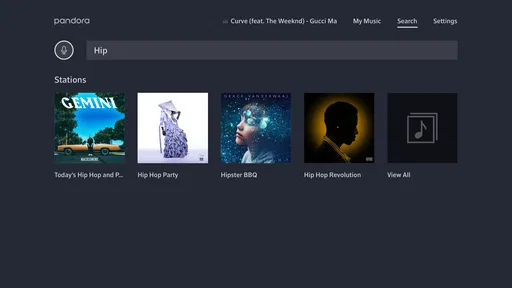
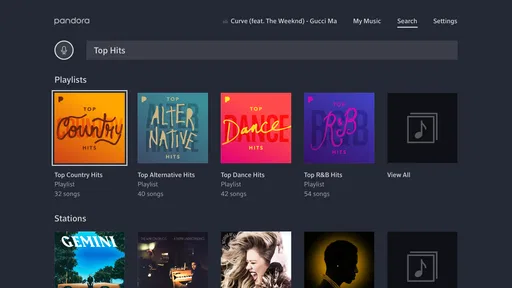
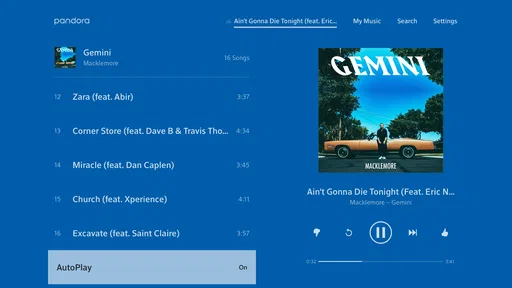
 Analysis by AppCompare
I see Pandora Music for TV as a useful living-room companion rather than a full replacement for every music app. Its main appeal is letting Pandora’s familiar listening experience move onto a television, where music can fill a room while people cook, tidy up, or spend time together. That suits listeners who want to choose a station and let it run without turning music selection into the evening’s main activity. It is less compelling if you mainly want precise control over every track or need a television app to double as a complete music library.
Where the TV format earns its place
A television can make casual listening feel shared. Instead of keeping a phone nearby and passing it around, I can put music on in the room where everyone is gathered. That small change matters during a meal with friends or a quiet weekend at home: the screen becomes a convenient starting point, while the music stays in the background. Pandora is especially suited to this kind of listening because stations and recommendations encourage a continuous flow rather than requiring me to build a queue from scratch.
The TV setting also changes how I’d use the app compared with listening through headphones. I’m more likely to pick a broad mood or familiar artist and let the station shape the soundtrack than to scrutinize each selection. If a song doesn’t fit, feedback can help steer what comes next. This makes Pandora a good fit for people who enjoy discovery but don’t want to actively search for every new track.
A practical routine, not just a party app
Picture a weekday evening: I’m making dinner, someone else is setting the table, and the television is already in the room. Starting a station there can provide music for the shared space without turning a phone into a remote that everyone has to negotiate over. The same setup can work for a low-key family gathering, a living-room workout, or background sound while doing chores. In each case, the benefit is convenience and atmosphere, not the promise of a carefully curated, track-by-track soundtrack.
For better results, I’d choose a station that matches the whole room rather than one person’s most specific listening niche. A distinctive favorite can be a good discovery seed, but a very narrow taste may make the music less suitable for guests. When the audience changes, switching to a more familiar artist or broader style is an easy way to make the listening feel more inclusive. That is a simple but useful distinction: Pandora’s personalization is strongest when the person steering it knows what kind of mood the room needs.
How it compares with other ways to listen
Compared with a conventional on-demand music service, Pandora’s station-led approach is more about letting recommendations take the lead than selecting an exact album or track for each moment. That can be refreshing when I want music without making a long list of decisions. The trade-off is that listeners who plan a precise sequence for a dinner, workout, or sing-along may prefer a service centered on direct track selection and queue management.
It also fills a different role from simply casting audio from a phone. A TV app can be a straightforward option when the television is already the natural hub of the room, while phone-based listening may be more convenient if I’m moving between spaces or want to keep the screen off. Neither approach is automatically better: the right choice depends on whether shared, visible playback or personal, mobile control matters more. Pandora’s TV version makes most sense when the screen is close at hand and the goal is to get music playing with little fuss.
Worth Reading Before You Choose

EA SPORTS FC Mobile 26 Is a Bigger Football Game, but It Takes Time

Flipboard Shows What News Apps Must Do Beyond the Feed

Switching to Android Auto Means Rethinking Your Driving Routine

Google Calendar Makes a Crowded Week Easier to Manage

Ludo King Makes the Most of the Minutes Between Plans

Baby Panda World Brings Quick Play to Modern Phones, but Its Game Library Feels Busy
Small choices that improve the experience
One helpful habit is to treat thumbs-up and thumbs-down feedback as gradual steering, not as a way to fix an entire station instantly. I’d use it when a selection genuinely misses the mood, while allowing a station a little room to explore. If I react only to whether a song is familiar, I may narrow discovery too quickly; if I give feedback based on the sound and style I want more of, the recommendations can become more useful for future listening.
It’s also worth deciding who will control playback before guests arrive. A shared room can make music feel communal, but too many people making changes can pull attention away from the gathering. Picking a station in advance and letting it run is often smoother than handing around the remote after every song. This is not a complicated setup trick; it is simply a way to make a recommendation-driven service work better in a social setting.
Another trade-off is that TV listening is tied to the room and the device. If I want to keep music with me while leaving the living room, switching to another device may be more practical than treating the television as a portable player. Pandora’s appeal here is the shared setting, so it is sensible to think of the TV as one place to listen rather than the only place. People who value uninterrupted listening across a changing routine should consider how they already use their account and devices before making the television their default.
Getting Started with Pandora Music for TV
First things first, setting up Pandora Music for TV is a breeze. Just download it from your TV’s app store, and you’re halfway there. If you’ve already got a Pandora account, you’re golden. Just log in, and your playlists, stations, and all your musical preferences are right there waiting for you. If you’re new to Pandora, no worries! Creating an account is super easy, and they guide you through the process step by step.
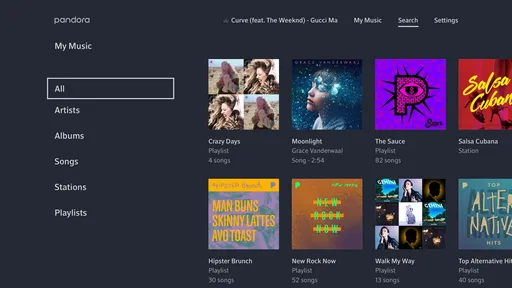
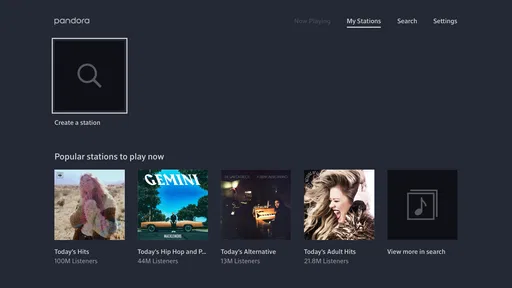
The interface is clean and straightforward, which I absolutely love. No one wants to fumble with complicated menus when all you want is to get that perfect background music going. The main screen shows your stations, playlists, and recommendations, making it super easy to navigate.
Music Discovery and Customization
What makes Pandora stand out is its music discovery feature. The app does a fantastic job of suggesting new music based on your listening habits. Whether you’re into indie rock, classical, or hip-hop, Pandora’s got something up its sleeve for you. I’ve discovered so many new artists just by letting the app run its magic.
Customization is where Pandora really shines. You can give a thumbs up or down to songs, and the app learns from your feedback, tailoring future recommendations to better suit your taste. It’s like having a personal DJ who just gets you.
Sound Quality and Streaming
The sound quality on Pandora Music for TV is top-notch. Whether you’re using a soundbar or just your TV’s built-in speakers, the audio is crisp and clear. I’ve spent hours just letting it play in the background while doing chores or entertaining guests, and it never disappoints.
Streaming is smooth, even on a standard Wi-Fi connection. I haven’t encountered any buffering issues, which is a big win in my book. The app also adapts to different network conditions, ensuring you get the best possible experience without interruptions.
Additional Features
One feature I found particularly cool is the ability to access your Pandora account from multiple devices. You can start a station on your phone and continue listening on your TV without missing a beat. It’s seamless and convenient, especially for those who move around a lot at home.
The ability to sync across devices is a game-changer for multi-taskers.
Also, if you’re a Pandora Premium subscriber, you can create custom playlists, listen offline, and enjoy ad-free music. It’s worth considering if you’re looking for a more personalized music experience.
What the subscription choice means
The app itself is free, so I can see why someone might want to try it before committing to anything. Pandora is made by Pandora, and its TV app sits in the music and audio category. The service has an average rating of 3.2 from around 821 ratings, which is a useful reminder that not every listener will have the same experience. I’d treat that as context rather than a verdict: whether station-based listening suits you is more important than a single average score.
There are over 10 million installs, and the app is rated for teens. Version 4.3.1 is the current version, and it requires iOS 7.0 or later. In-app purchases are listed at $4.99 per item. Those details matter most if you are deciding whether to keep things simple with the free app or explore paid options; I would not subscribe on the assumption that a TV screen alone makes a service better. First, see whether you like the way stations and recommendations fit your habits.
If you mainly want an easy stream of music, the free option may be enough to test the basic appeal. If you want the paid listening benefits described in the app, consider whether custom playlists, offline listening, and ad-free playback are actually part of your routine. Offline listening is less central when the TV is staying at home, for example, while avoiding ads may matter more during a long stretch of background playback. I’d weigh the features against where and how I listen instead of treating an upgrade as automatically worthwhile.
Who should choose something else
I would not make this my first choice for someone who thinks of music as a collection to browse and control song by song. If you already know exactly what album you want, or you carefully sequence tracks for a party, a more direct on-demand service may feel less restrictive. Pandora’s recommendations are a strength when I want surprise and continuity, but that same approach can be a limitation when precision is the point.
It may also be the wrong fit if you rarely use a television for audio, prefer listening privately, or want music to follow you from room to room without switching devices. A phone, speaker, or another familiar playback method may be more convenient in those situations. The TV app is most convincing when it makes a shared space easier to soundtrack; it is not a reason to change a listening routine that already works well.
As an app in the wider music and audio field, Pandora takes a recognizable middle path between passive radio-style listening and deliberate playlist curation. I like that it can reduce the small decisions involved in choosing background music, while still letting me shape a station through feedback. Its strongest audience is someone who enjoys discovering tracks and wants a convenient home listening option, rather than a listener who expects every selection and playback detail to be under direct control.
Final Thoughts
So, is Pandora Music for TV worth it? Absolutely! It’s a fantastic app for anyone who wants to enjoy their favorite tunes on a bigger screen. With its user-friendly interface, excellent music discovery features, and high-quality streaming, it’s hard not to fall in love with it. Whether you’re a casual listener or a music aficionado, Pandora has something to offer.
So, why not give it a try? You might just find your new favorite artist or rediscover old classics. And who knows, you might even find yourself singing along in your living room!
Pros
- Seamless integration with smart TVs.
- Intuitive user interface for easy navigation.
- Personalized music recommendations.
- High-quality audio streaming.
- No ads with premium subscription.
Cons
- Limited offline listening options.
- Free version includes ads.
- Requires consistent internet connection.
- Not all features available on all devices.
- Some playlists may repeat songs.
FAQs for Pandora Music for TV
What features does Pandora Music for TV offer?
Pandora Music for TV allows you to stream personalized music stations and playlists directly to your TV. It offers features like curated playlists, genre stations, and the ability to create your own stations based on artists, songs, or genres. The TV app also supports seamless integration with your Pandora account, providing a tailored music experience.
Is Pandora Music for TV free to use?
Pandora Music for TV offers both free and premium tiers. The free version includes ads between songs, while Pandora Plus and Pandora Premium provide ad-free listening, offline downloads, and higher audio quality. Subscriptions can be accessed through your Pandora account and synced across devices, including your TV.
How can I control Pandora Music on my TV?
You can control Pandora Music on your TV using your TV remote, mobile device, or voice commands if your TV supports voice assistants like Alexa or Google Assistant. This allows for easy navigation through your music library, playlists, and settings, making it convenient to enjoy your music hands-free.
Does Pandora Music for TV support multiple accounts?
Pandora Music for TV supports the use of multiple accounts, allowing each household member to access their personalized music experience. Users can switch between accounts directly on the TV app, ensuring everyone can listen to their preferred music without affecting others’ playlists or stations.
What devices are compatible with Pandora Music for TV?
Pandora Music for TV is compatible with most smart TVs, streaming devices like Roku, Amazon Fire TV, and Apple TV. It’s essential to check if your specific device model supports the Pandora app. Installation is straightforward through the TV’s app store, enabling quick access to your favorite music.


